Manual · Centurion RDO
Centurion RDO setup: the RDO II roll-up motor in plain English
Centurion's RDO II drives a roll-up garage door from the end of its axle. A drive unit slides onto the door's drum wheel, and a separate control box on the wall holds the battery, the courtesy lamp and the settings. It lifts with 300 N, runs on 24 V and keeps working from its battery in a power cut. Here's its setup from Centurion's manual in plain English: fitting, limits, force learning, remotes, the release cord and Centurion's own fault table, with the official PDF at the end.
Six-month guarantee on our repairs
1-year guarantee on every motor kit we supply and install
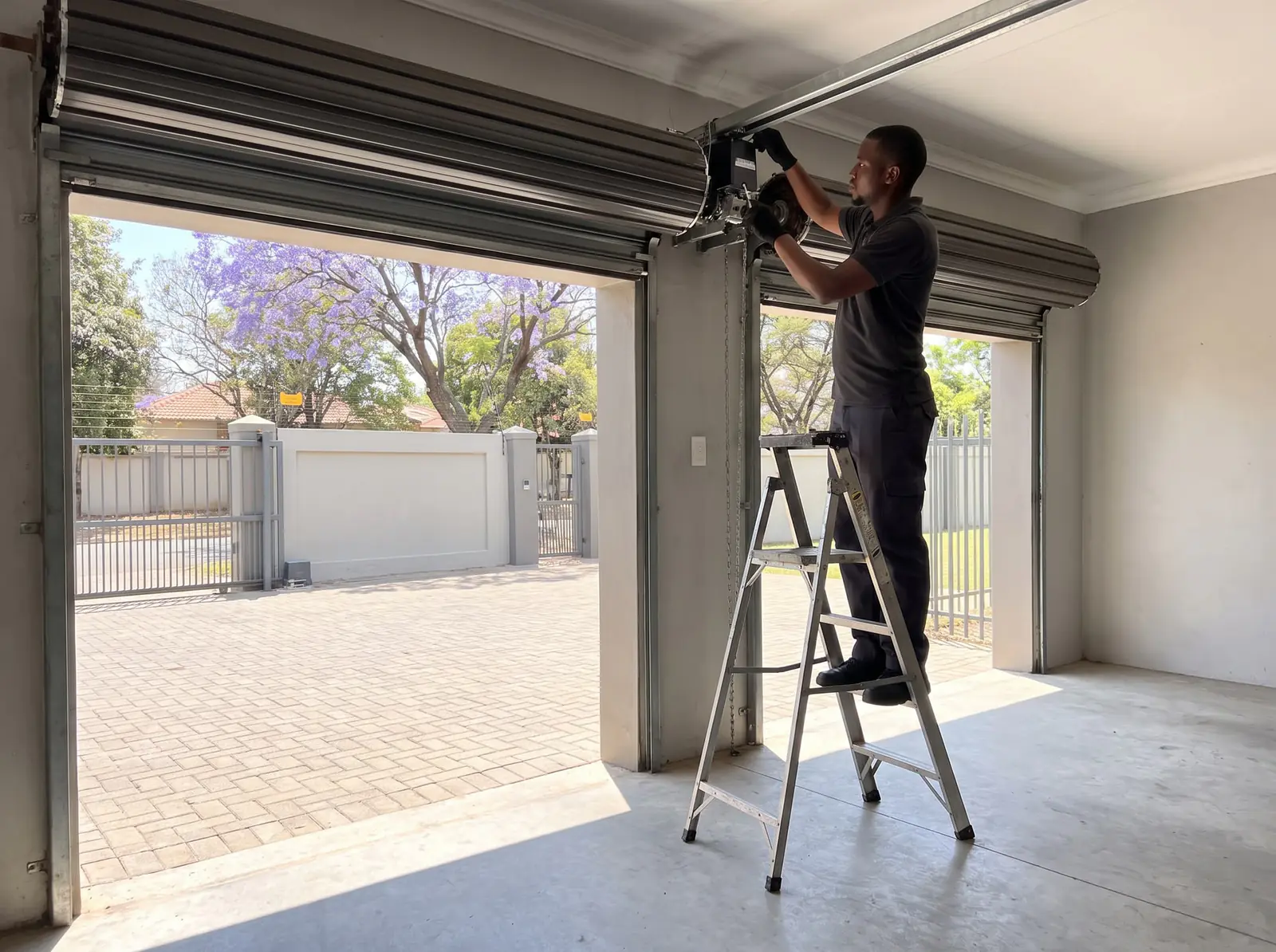
How the RDO II is put together
The RDO II comes in two parts joined by a cable:
- The drive unit slides over the door's axle at one end, with a spoke of the door's drum wheel sitting between its two plastic forks. Its limit cams and the red release cord are here.
- The control box hangs on the wall at about chest height. It holds the battery, the control card, the courtesy lamp and the buttons, and a plug-in charger beside it keeps the battery topped up. The box is not waterproof: keep it away from rain, hoses and damp walls.
| RDO II | |
|---|---|
| Mains | 220 V AC, ±10%, to the charger |
| Charger | 27.5 V, with a green light when it has power |
| Control voltage | 24 V DC |
| Lifting force | 300 N |
| Door travel | Up to 4.5 turns of the drum wheel |
| Remotes | NOVA code-hopping, 433 MHz; 22 remote codes stored |
| Obstruction safety | Current sensing, adjustable |
The door comes first. It must take the same effort up as down, no more than about 15 kg, and stay within 100 mm of where it's let go between 900 and 1,200 mm up. A worn or damaged door is repaired before the motor goes on.
Fit to the drum. The door bracket sits 85 to 125 mm in from the curtain's edge. Where the forks don't fit the drum's slots, or the drum is weak, Centurion's adaptor plate goes in between; where the drum wheel sits too deep in the curtain, an extra one nearer the edge helps. The motor ships set for the right-hand end, seen from inside; dipswitch 6 sets it for the left.
How the RDO II is fitted
Centurion says plainly that the RDO II is not a home handyman's install. This is the order the manual gives, so you know what the job involves:
- Control box. On the same wall as the door bracket, at chest height, on three screws. Its red battery cable ships disconnected to save the battery and goes onto the positive terminal first; the charger stays unplugged.
- Door open and propped. Fully open on its stoppers, with a strong, padded prop under the drive end that can take the door's whole weight.
- Drive on. The U-bolt and bracket come off at that end, one pull on the release lever frees the drive's forked gear, and the drive slides over the axle until a drum spoke sits between the forks. The bracket goes back up and Centurion's U-bolt clamps the two together.
- Checked by hand. Raised and lowered fully, the door must run smoothly without catching on the drive.
- Finishing. The release cord is cut to hang about 1.8 m up, the weight bar goes on the bottom rail to stop the curtain ballooning, and the curtain is fixed to the drum wheel with screws or rivets at two points at least 90° apart.
The limits, power and force learning come next.
The red release cord
- One pull on the red cord frees the drive from the door; another pull re-engages it.
- Pull it with the door fully closed. If the door is open or part-open, first make sure no one and nothing is under it or in its path.
- Never open or close the door by pulling on the cord. Lift and lower the door itself.
The cord should hang about 1.8 m above the floor with its instruction tag still on. The release on other garage motors is covered in how to open a garage door manually.
Setting the limits on the RDO II
The RDO II's limits are two cams under a cover on the drive unit, each turned until it clicks a switch. The drive is freed for both:
- Open limit. With the door fully open by hand, take off the limit cover and loosen the three cam screws just enough to turn the cams with a firm push. Turn the open (lower) cam towards its switch until the switch clicks, then about 10° more. To check, lower the door a little and raise it slowly: the switch should click about 100 mm before the door reaches the rail stops.
- Closed limit. With the door down at the closed position you want, turn the close (upper) cam towards its switch until it clicks, then about 10° more. Raised and lowered slowly by hand, the switch should click about 100 mm before the door touches the ground.
- Power and test. Plug in the charger (its light glows green), move the door to halfway and pull the cord once to engage the drive. Run the door with the red operate button on the front of the control box and watch where it stops.
- Adjust and lock. Turning a cam towards its switch shortens the travel; turning it away lengthens it. When both ends are right, tighten the three cam screws firmly and refit the cover.
Force learning and the obstruction test
Dipswitch 1 chooses how the RDO II sets its obstruction force:
- Adaptive mode (on) learns the run time and force itself and keeps adjusting for weather and an ageing door, cutting down "ghosting", a stop or reverse with nothing in the way. After power-up it needs five uninterrupted cycles from closed, quick-flashing while it learns. The green Offset pin under the lamp cover then sets the margin from 30 N (3 kg) to 100 N (10 kg).
- Manual mode (off) suits a worn or badly balanced door. Learn held two seconds gives a paused double flash; then, with the door moving, the green pin (opening) and red pin (closing) are each turned anti-clockwise until the door stops, then back 5°.
Forced learn starts again: hold Learn a few seconds until the LED quick-flashes, then run five full cycles from closed, watching the doorway, because the force sits at maximum while it learns. It also relearns by itself after three safety reverses or stops in a row.
Test it monthly. Opening, a firm push down on the door about 450 mm up must stop it; closing onto a block of wood about 32 mm thick under its middle, it must stop and reverse. After an obstruction it reverses for 3 seconds and stops, so the door never opens fully on its own.
Remotes, the wall pendant and holiday lockout
The RDO II comes with two four-button NOVA remotes: one for the car, one for the wall as a pendant, in sight of the door and at least 1.5 m up. Each button carries one of four functions, chosen by how many times Learn (under the lamp cover) is pressed:
| Learn pressed | Function | What the button does |
|---|---|---|
| Once | Open and close | Opens, stops and closes; a press while it's closing reverses it |
| Twice | Light | Switches the courtesy lamp on and off |
| Three times | Holiday lockout | Held 3 seconds, locks out every other remote; the door closes first if it's open |
| Four times | Autoclose override | Held 3 seconds with the door closed, opens it and keeps it open |
The light and LED flash that many times every two seconds; hold the remote's button for 3 seconds and three flashes confirm it. Learn mode ends 10 seconds after the last button. The forced learn must be done before any remote is learnt. The full steps and deleting remotes are on RDO remote programming.
Holiday lockout shows one flash as it locks and two as it unlocks; while it's on, another remote's run button only makes the light flash twice.
Dipswitches, auto-close, beams and the lamp
The dipswitches sit on the control card under the lamp and control-box covers, so the mains comes off first:
| Dipswitch | On | Off |
|---|---|---|
| 1 | Adaptive mode | Manual mode |
| 2 | Safety beams in use | No beams |
| 3 (with 2 on) | Auto-close | No auto-close |
| 4 | Door service monitor | Off |
| 5 | Soft stop (Adaptive mode only) | Off, for a poorly balanced door that won't reach its ends |
| 6 | Left-hand installation | Right-hand installation |
Auto-close needs beams. It closes the door 3 seconds after it reaches open if something has passed through the beams, or after 30 seconds if nothing has. Centurion's i5 or other four-wire beams (jumper on 4W), or two-wire beams (2W), sit 125 mm off the floor; the receiver's green light shows they're lined up. If the beams fail, holding the black Run button closes the door; let go early and it reverses.
The courtesy lamp goes off 90 seconds after the last signal, and stays off below 24 V on battery. A replacement bulb must be 24 V: Centurion warns a 12 V bulb overheats the transformer and can damage the control card. Speed can be set from 70% to 100% in Adaptive mode.
What the RDO's light is telling you
The LED under the lamp cover shows what the RDO II is doing:
| LED | Meaning |
|---|---|
| Glowing steadily | At the closed limit |
| Slow flash | At the open limit |
| Medium flash | Learning or deleting remotes |
| Quick flash, Adaptive mode | Learning drive force |
| Quick flash, Manual mode | Force adjustment mode |
| Paused double flash | Manual force adjustment open |
Two flashes of the courtesy lamp when you press a remote mean holiday lockout is on.
Centurion's troubleshooting table
| Symptom | Likely cause | What to do |
|---|---|---|
| Door won't run | No mains, something in the way, the door locked or jammed | Restore power, clear the doorway, unlock the door |
| Won't reverse when it hits something | Force set too high | Force adjustment: a technician's job |
| Comes down, then goes back up on its own | Force too low; wind or cold stiffening the door; something under it | Clear the doorway; then the force needs adjusting |
| Runs from the box but not the remote | Remote broken or not learnt, aerial bent, remote battery flat | Try the other remote; straighten the aerial; new 12 V remote battery |
| Doesn't close fully | Close limit out of adjustment | Reset the close cam |
| Courtesy lamp out | Bulb blown | A new 24 V bulb |
| Stops before fully open | Obstruction, weak springs, or force | Free the drive and check the door by hand; springs are a service job |
| Auto-close not working | Beams faulty, obstructed or badly wired; auto-close not switched on | Clear the beams; check dipswitches 2 and 3 |
A door that's heavy by hand is a spring problem before it's a motor problem: see garage door springs. Faults on other garage motors are in garage door not opening.
When to call us
Call us for an RDO II that won't reverse, reverses for no reason, stops short or runs past its ends, a drive that has come loose from its drum, or a battery that no longer carries it through a power cut. We fit and repair RDO motors, replace drum wheels and fit adaptor plates, set limits and force, and learn remotes. The charger needs a plug point beside the control box; a new one is a job for a registered electrician. All our spare parts are genuine. Six-month guarantee on our repairs.
When a new motor makes more sense, our installed Centurion roll-up kit uses the current RDO Digital. Prices checked October 2026. Your exact price is set in a free quote before any work starts. No call-out fee when we do the work. If no work is done, a R650 call-out fee applies.
Roll-up garage kit
Centurion RDO Digital roll-up kit
R3 899incl. installation
In the kit
- RDO Digital motor
- 4-button NOVA remote
- 24 V battery back-up
Our promise1-year guarantee on every motor kit we supply and install
Prices checked October 2026. Price includes the kit listed, standard installation on a gate or door that already runs freely, and our 1-year kit guarantee. Not included: a power point at the motor if there isn't one (a job for a registered electrician), extra rack, gate or door repairs, and accessories. These are quoted before any work starts.
Centurion's PDFs
- Centurion RDO installation manual: the RDO II's installation, settings, remotes and fault table
- Centurion RDO Digital installation manual: the newer RDO Digital, which has its own setup
Centurion's motor for sectional and tip-up doors is on the Centurion SDO4 manual, and the rest of the range on Centurion.
Questions
Centurion RDO questions
How to install Centurion RDO?
The control box goes on the wall, the door is propped fully open, and the drive slides over the axle with a drum spoke between its forks, clamped by Centurion's U-bolt; then the cord, weight bar, limits and force learning. Centurion says it's a qualified installer's job. See the fitting order.
How to set limits on Centurion RDO?
With the drive freed, loosen the three cam screws under the drive unit's limit cover and turn each cam towards its switch until it clicks, then about 10° more: the open cam with the door up, the close cam with it down. Each switch should click about 100 mm before the end. Read the steps.
How to program Centurion RDO?
Press Learn under the lamp cover once, twice, three or four times for open-close, light, holiday lockout or autoclose override, then hold the remote's button for 3 seconds until three flashes confirm. The forced learn has to be done first. See the remote functions.
How do I reset a Centurion RDO?
The RDO II's manual has no single factory reset. Its two fresh starts are a forced learn, holding Learn until the LED quick-flashes and then running five full cycles from closed, which relearns the run time and force; and deleting every remote from the Learn and Run buttons. See force learning.
Why won't my Centurion RDO close all the way?
Centurion's table points to the close limit cam, which should click its switch about 100 mm before the door touches the ground. Check nothing is under the door or in its tracks first. If the cam is right and it still stops short, the force or the door's springs need a technician. See the fault table.
What is the Centurion RDO adaptor plate for?
It joins the RDO II to a drum wheel whose slots don't take the drive's forks, or reinforces a drum that isn't strong enough. Where the drum wheel sits too deep inside the curtain, Centurion suggests an extra drum wheel nearer the edge instead. See fitting to the drum.
Book a technician
Get a garage door quote
Job card
We WhatsApp or call you back. Fields marked (required) are needed.